Cosmas

Cosmas Free for Windows

Every sessionbecomesa chronicle.

Cosmas is a desktop app for roleplayers. It reads the recordings you already make with Medal or OBS and helps you turn them into characters, factions, places and events you can find again. Your chronicle stays on your PC and stays private until you decide to share it.

Version 1.2.0 · 294 MB · Windows 10 and 11, 64-bit. Or browse the public chronicle →

What it is

If you play on roleplay servers, you probably record. Medal clips the best bits, OBS keeps whole evenings, and after a month nobody remembers which night the duke was poisoned or what the blacksmith’s daughter was called.

Cosmas sorts those recordings by game and evening, plays the game, Discord and your microphone as separate tracks, and lets you mark the moments that matter. From there you build the story: events with a write-up and a journal, characters with portraits and relationships, factions, houses, places and servers, all on a timeline.

Optional AI does the boring part: it transcribes what was said, describes what was on screen, reads the name tags above characters and drafts a chronicle of the evening for you to accept or throw away.

Who it’s for

Built in the CZ/SK roleplay community, for anyone who plays a character for longer than one evening.

  • Roleplay players

    Keep your character’s story straight across servers and months: who they met, what they promised, where it happened, with the clip to prove it.

  • Streamers and recorders

    You already record with Medal, OBS or ShadowPlay. Cosmas finds the folders on its own, keeps the separate audio tracks and turns hours of footage into moments you can find.

  • Communities and lore keepers

    Publish characters, houses and events to the public chronicle with your name and a licence, and let others ask before they reuse your lore.

How it works

Six steps from a raw recording to a story you can share.

  • Record

    Play as usual with Medal, OBS or ShadowPlay running. Separate audio tracks for the game, Discord and your mic are kept.

  • Scan

    Cosmas finds your recording folders, sorts clips by game and evening and reads Medal’s titles and hotkey bookmarks.

  • Moments

    Mark moments and segments while you watch, take snapshots and portraits, cut clips to MP4.

  • Events and characters

    Group an evening into an event, tag who was there, write it up and keep a dated journal.

  • Chronicle

    See the whole story on a timeline, a calendar or per character. AI can draft events from what was said.

  • Share and sync

    Sign in with Discord to sync with the web. Share a record by link, publish it, or use the character on Discord.

Features

The desktop app does the heavy work on your PC. These are real screenshots with made-up demo data.

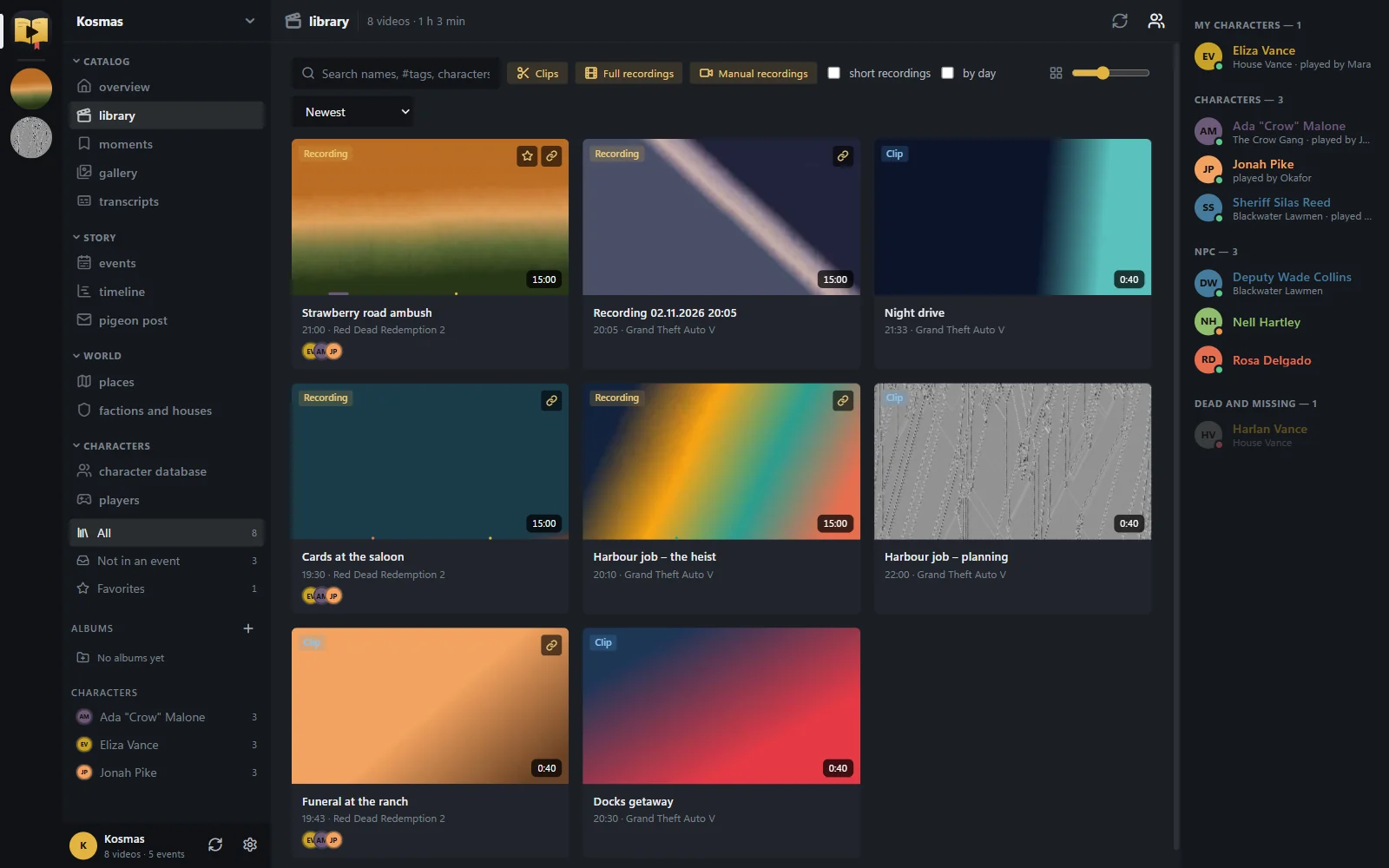
Recordings library: Every clip and recording in one place, grouped by game and evening.

Recordings library

Every clip and recording in one place, grouped by game and evening.

  • Finds Medal folders on its own (Videos\Medal, X:\Medal); add OBS, ShadowPlay or any other folder.
  • Medal clip titles, games and hotkey bookmarks are read automatically; Medal’s own database is never written to.
  • Filters by game, server, type, album, tag and character, and search in what was said once a video is transcribed.
  • Multi-select with Ctrl/Shift and drag clips onto an album or an event.
Multi-track player: Hear exactly the part you need: the game, Discord or yourself.

Multi-track player

Hear exactly the part you need: the game, Discord or yourself.

  • Game, Discord and microphone play at once as separate tracks; mute, solo or set each one’s volume.
  • Track presets (Ctrl+Shift+1…9) and default tracks for every game.
  • Frame preview on hover and a loudness waveform for each track under the seek bar.
  • Resumes where you stopped, pops out into its own window and decodes video on the GPU.
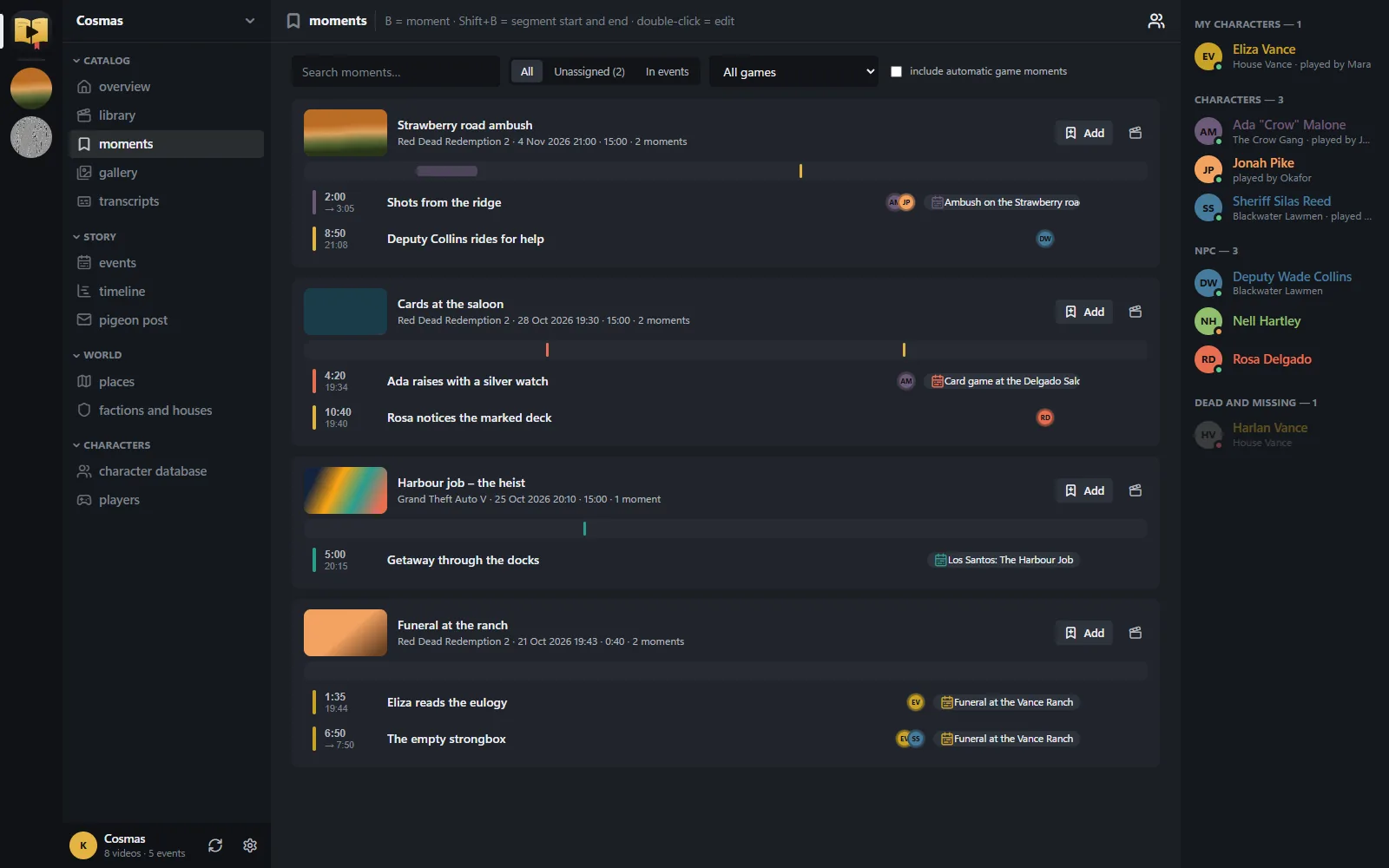
Moments and clips: Bookmarks and segments from all your videos, attached to events and characters.

Moments and clips

Bookmarks and segments from all your videos, attached to events and characters.

  • B marks a moment, Shift+B a segment, P drops a moment straight into an event.
  • Medal hotkey bookmarks appear on their own; automatic game moments like “Double Kill” are hidden.
  • I / O set a clip, then export it to MP4 with all audio tracks.
  • S takes a snapshot for an event, a cropped picture or a character portrait.
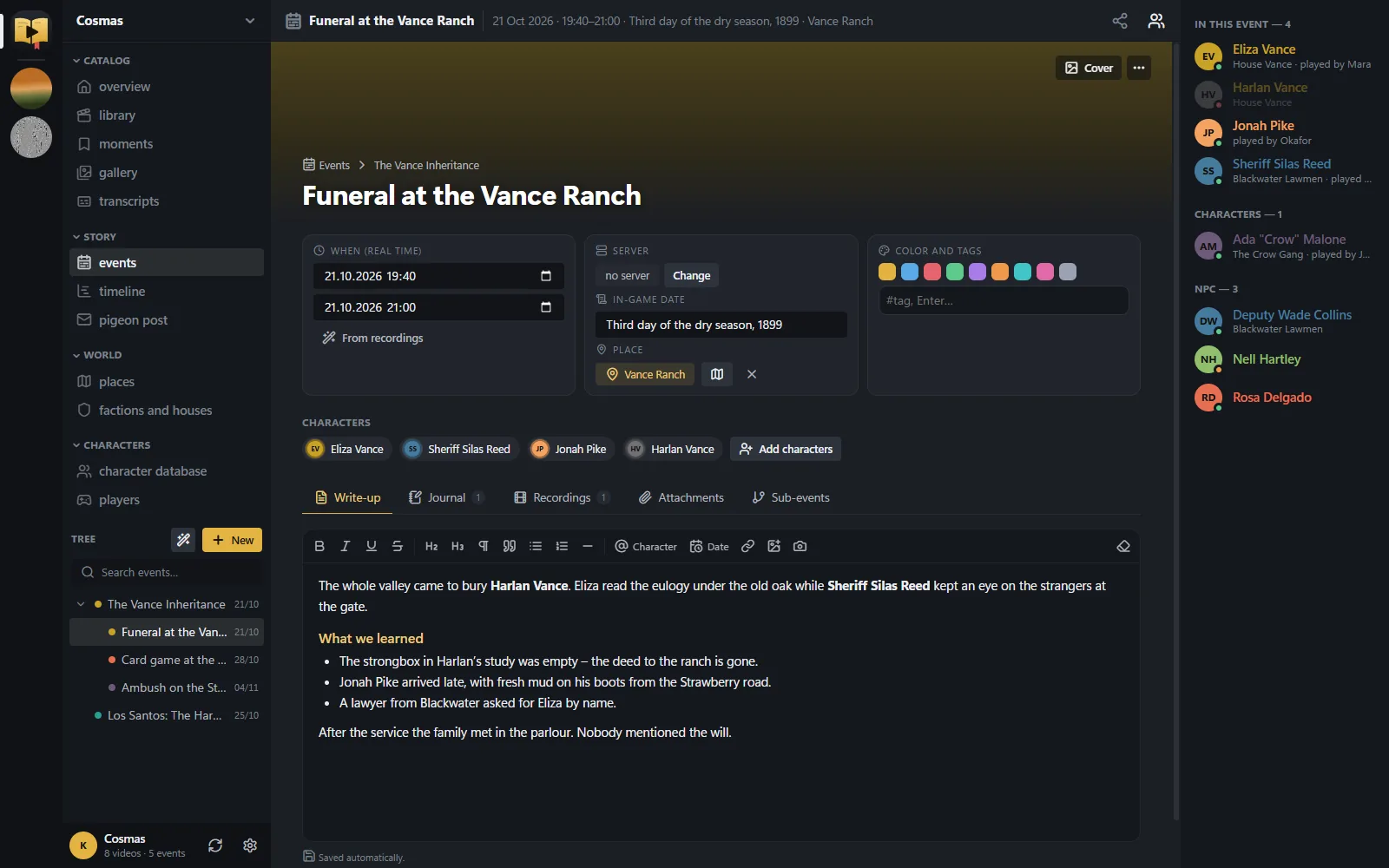
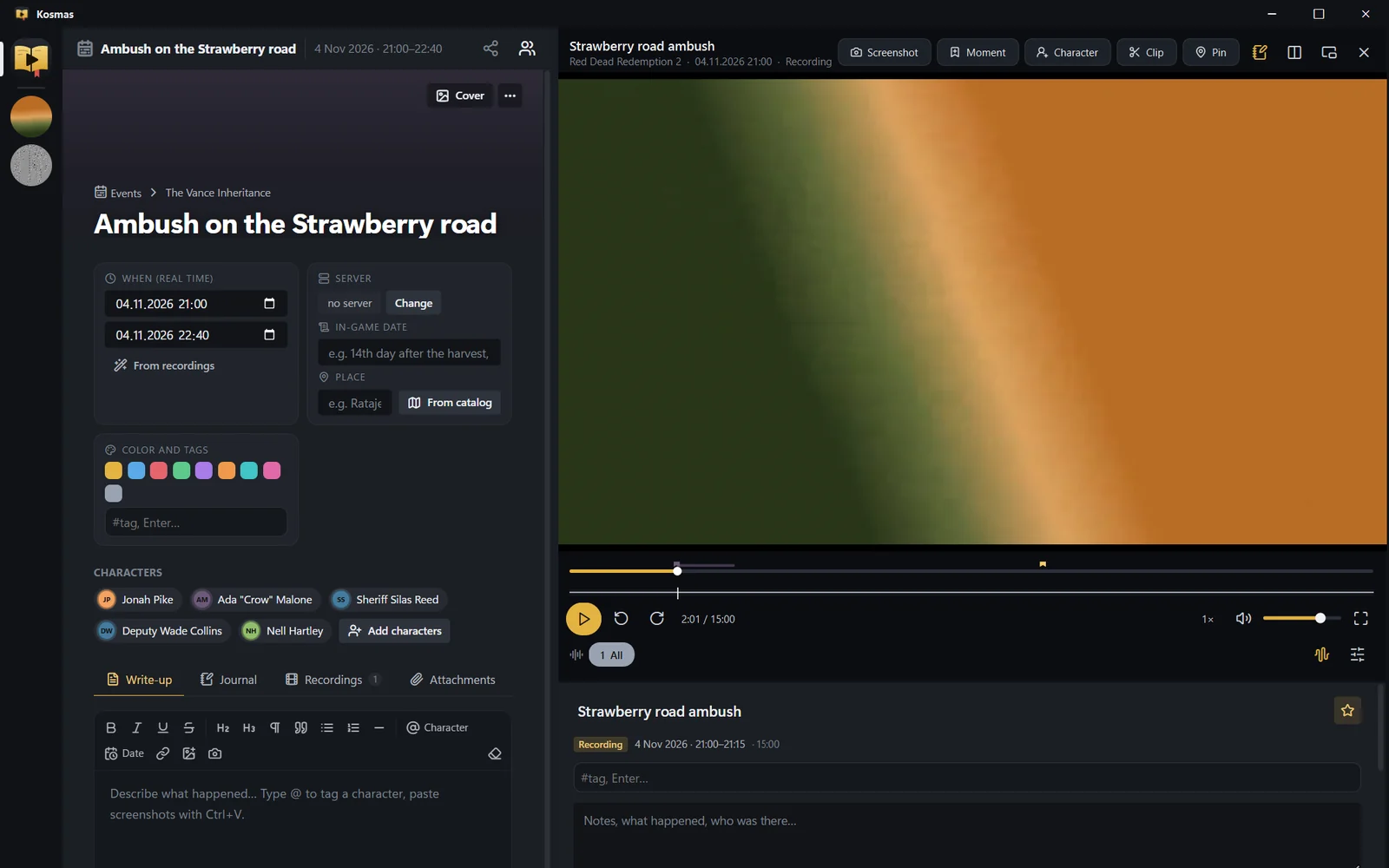
Events and journal: The story itself: what happened, when, where and who was there.

Events and journal

The story itself: what happened, when, where and who was there.

  • A tree of events and sub-events with real and in-game dates, a place, tags and characters with roles.
  • A rich-text write-up with @ mentions, and a journal of dated entries with attachments.
  • Attached recordings with smart suggestions; “Suggest from recordings” groups unsorted videos into game nights.
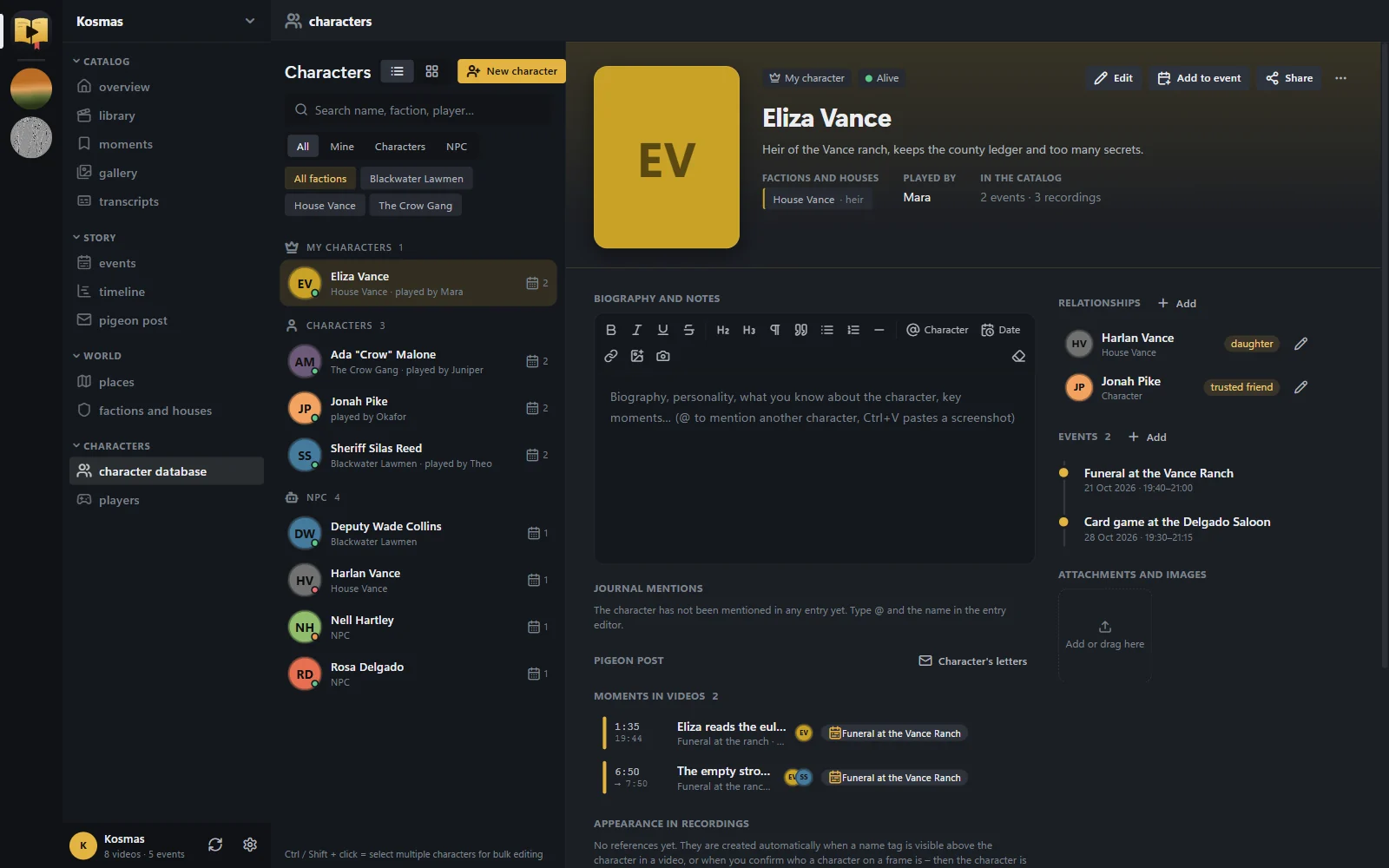
Characters, factions and places: A database of your world that keeps track of who is who.

Characters, factions and places

A database of your world that keeps track of who is who.

  • Character profiles with portrait, status (alive, dead, missing), player, biography and where they appear.
  • Relationships that follow gender (father/mother ↔ son/daughter, liege ↔ vassal …) with notes.
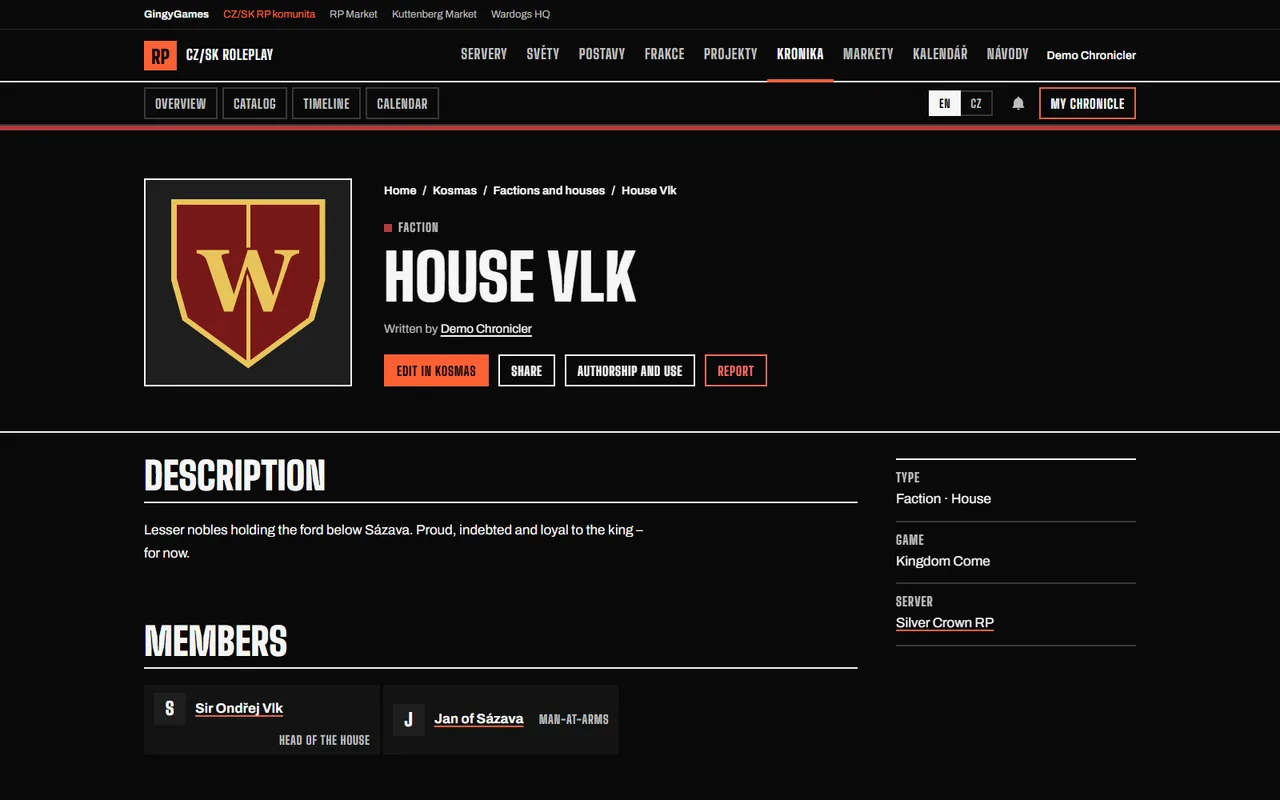
  • Factions and houses with coats of arms and members with roles; places with owners and parent places; servers with the period you played there.
  • Bulk edits with Ctrl/Shift + click.
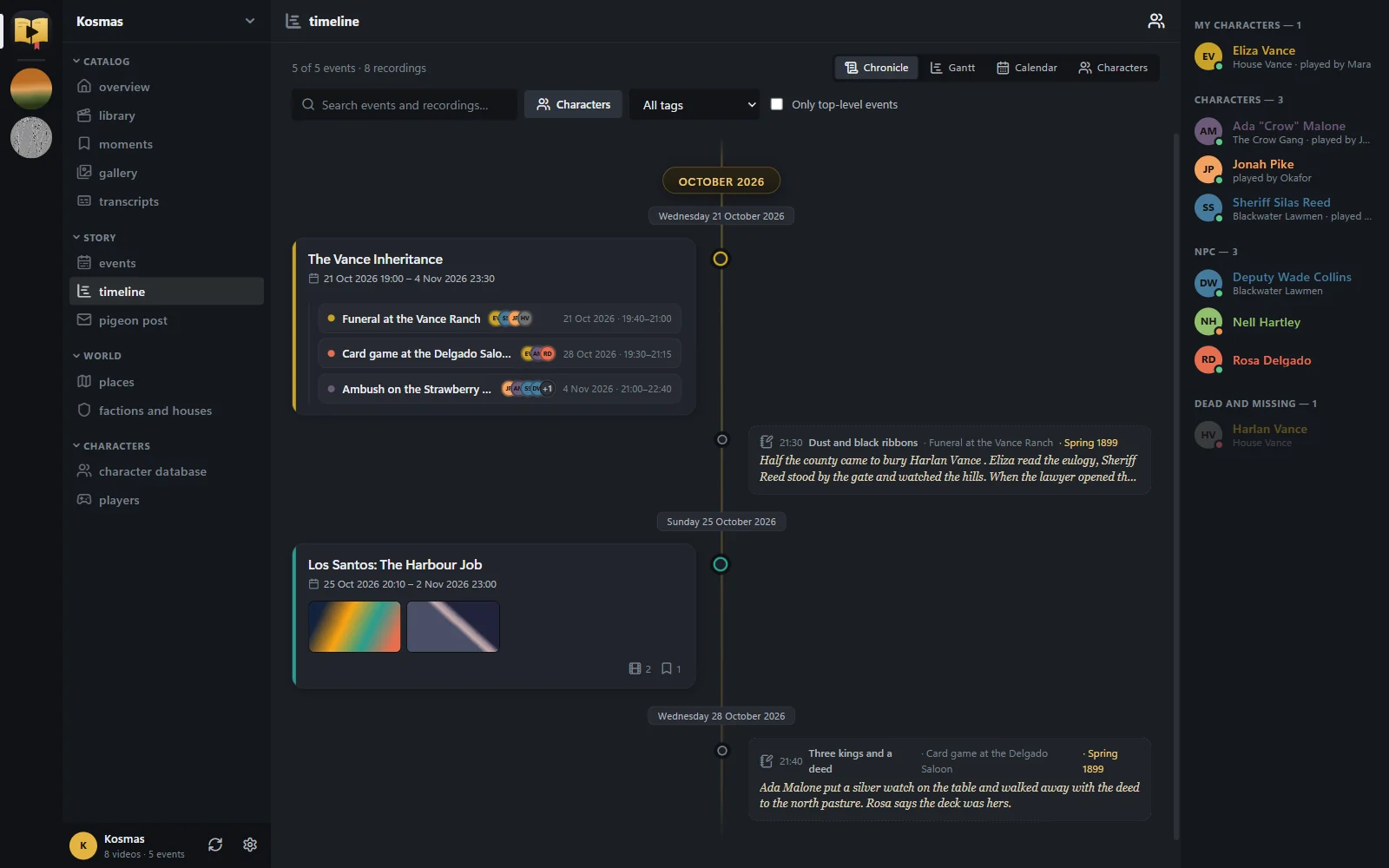
Timeline: The whole chronicle in order, across servers and evenings.

Timeline

The whole chronicle in order, across servers and evenings.

  • Four views: a chronicle, a zoomable Gantt timeline, a calendar and character lanes.
  • Moments show as flags; selecting a server filters the timeline like everything else.

All features in detail

AI that works for you

Optional and off until you choose where it runs. Free on your own PC, or through a paid service you pick.

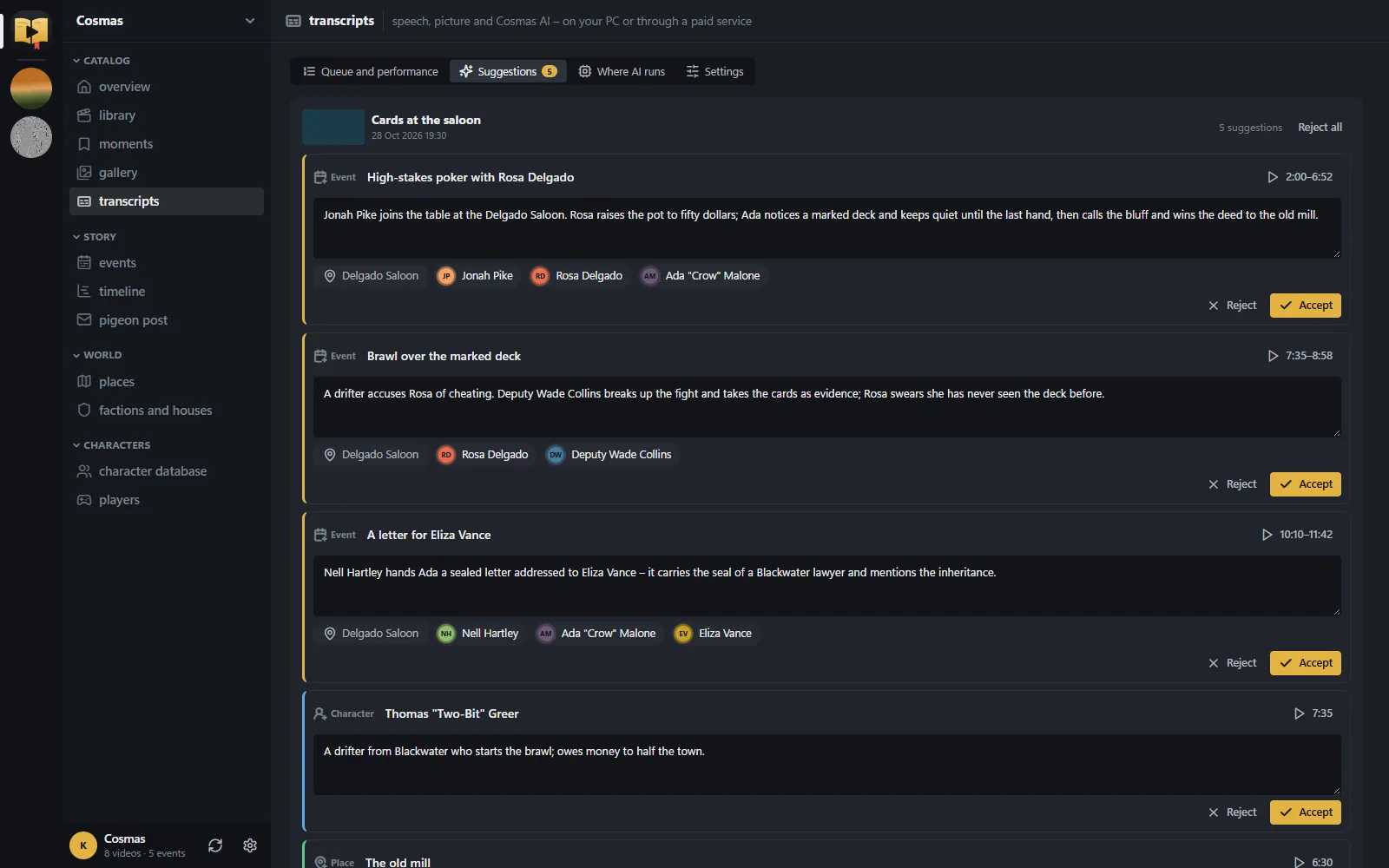
AI chronicler: After a transcript, a stronger text model reads the evening in blocks with a running memory of the plot and what your database already knows.

AI chronicler

After a transcript, a stronger text model reads the evening in blocks with a running memory of the plot and what your database already knows.

  • Writes chapters and a summary of the evening, and saves mentions to characters, places and factions.
  • Suggests new events, characters, places and factions; accept one with a click and it links back to the right second of the video.
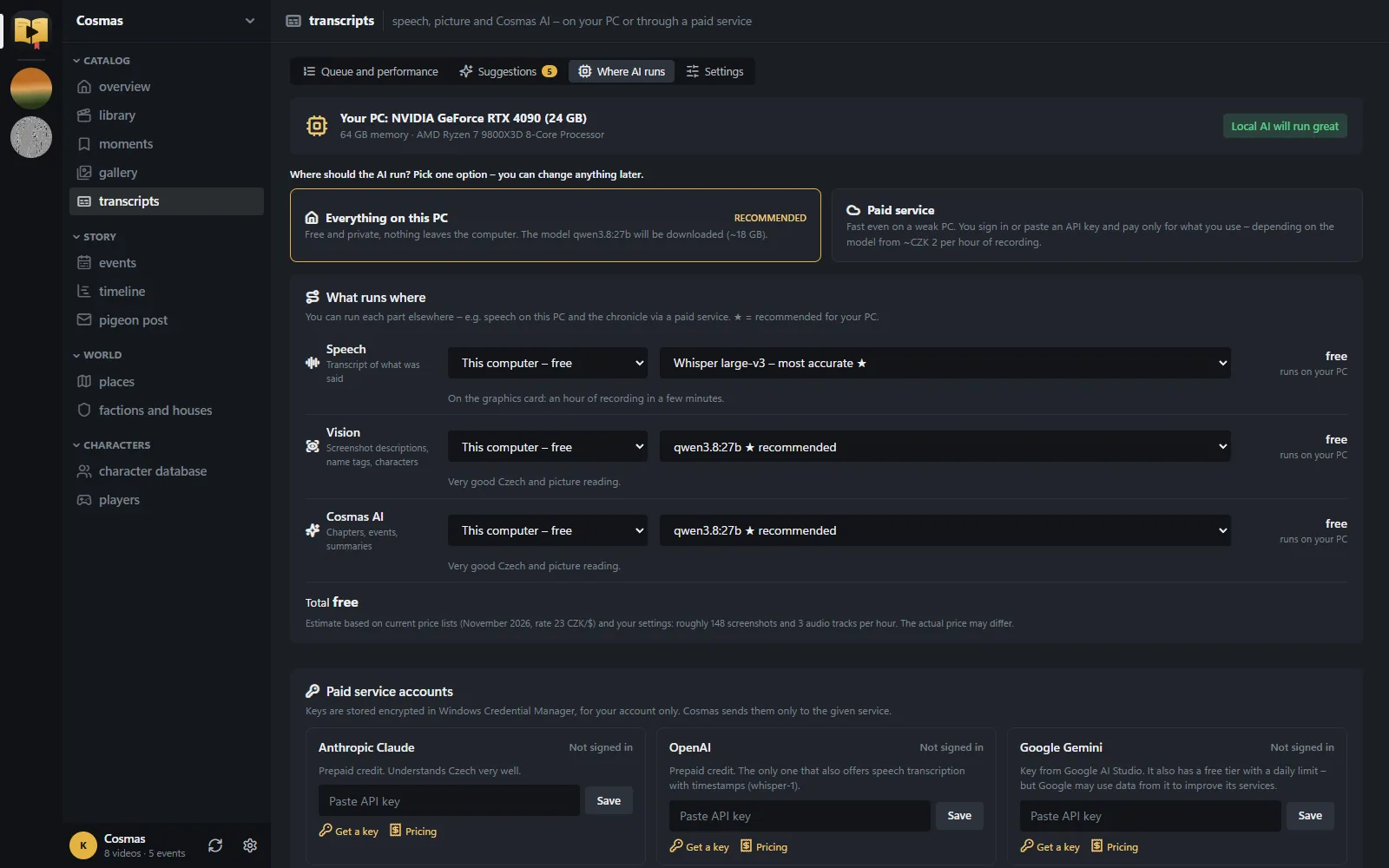
Where the AI runs: Cosmas looks at your graphics card, memory and processor and recommends what your PC can handle.

Where the AI runs

Cosmas looks at your graphics card, memory and processor and recommends what your PC can handle.

  • On this PC: Whisper for speech, Ollama for vision and the chronicle. Installed and downloaded with one click. Nothing leaves your PC.
  • Paid service: Groq, Anthropic Claude, Google Gemini, OpenAI or OpenRouter. You pay them directly; Cosmas shows the estimated cost per hour of recording and what you spent in the last 30 days.
  • API keys are stored encrypted in Windows Credential Manager. You can mix: speech locally, the chronicle through a service.
  • Transcripts

    Each audio track separately (you, the game, Discord), in the background, one video after another. Search in what was said and turn on subtitles in the player.

  • Image descriptions

    Frames are described mostly during conversations. The model reads name tags above characters and links them to your characters and players.

  • Faces and appearance

    Faces found in conversations can become portraits, and characters are recognised by clothing and hair across a session.

  • Stays out of your game

    The queue pauses while you play a game and continues afterwards, and picks up where it stopped after a restart.

Desktop or web

One chronicle, two ways in. The desktop app does the heavy work on your PC; the web version needs no install. They sync when you sign in.

FeatureDesktop appWeb Alpha
Installyes Installer for Windows 10 and 11yes Nothing to install, runs in the browser
Recordings libraryyes Finds Medal folders on its own, OBS and ShadowPlay folders tooyes Local folders in Chrome and Edge, nothing is uploaded
Medal detailsyes Clip titles, games and hotkey bookmarksno dates from file names only
Player with momentsyes Every formatyes YouTube and local MP4/WebM
Multi-track audioyes Game, Discord and microphone at onceno one track
Clipsyes Export a segment to MP4no segments only, no export
AI transcripts and image descriptionsyes On your PC for free, or a paid serviceno
AI chronicleryes Suggests events, places and charactersno
Characters, factions, places, events, lettersyes yes
Timeline and calendaryes yes
Share links and the public chronicleyes Through syncyes
Works offlineyes no

The web version is an early alpha. It shares your chronicle with the desktop app but doesn’t do the heavy work: no multi-track audio, MP4 export, AI or Medal details yet.

Private by default

Cosmas is local first. Nothing leaves your PC unless you sign in, sync or pick a paid AI service.

  • On your PC

    The catalogue is a file on your disk and works offline. Your video files are never uploaded.

  • On the web

    When you sync, your chronicle is stored on the Cosmas server, private until you share a link or publish a record.

  • AI

    Local AI keeps everything on your PC. A paid service receives only the audio or frames it needs, and only from you.

Read the privacy details

Cosmas on Discord

The community RP bot reads your characters straight from Cosmas, so there is one sheet to keep up to date.

  1. Use on Discord

    Switch it on for a character and play it in the community’s Discord worlds: /ic messages in its name, its inventory and scenes.

  2. Character cards

    Characters shared by link or published get a card in the community’s character forum. It updates when you edit the character.

  3. The /kronika command

    Search the public chronicle from any channel and post a record as a card with a link.

Public chronicle and lore registry

What you publish carries your name and your terms.

Public chronicle and lore registry
  • Authorship

    Each published record shows its author and the date it was first published, as proof of who came up with it.

  • Licences

    All rights reserved, use with permission, CC BY, CC BY-NC or CC0. You choose per record.

  • Permission requests

    “I want to use this” notifies the author, and a log shows on which servers the lore was used.

  • Wiki and moderation

    Revision history with rollback, edit suggestions, discussion, and reports that go to the moderators.

Browse the public chronicle Chronicle timeline

Start yourchronicle.

Free, installs in two minutes without administrator rights, and keeps your recordings where they are.

Questions

Something else? Ask on the community Discord or send feedback.

Is Cosmas free?

Yes. The desktop app, the web version and the public chronicle are free. AI can run on your own PC at no cost; paid AI services are optional and you pay them directly.

Do I need Medal?

No. Medal gives the richest details (clip titles, games, hotkey bookmarks), but any folder with recordings works: OBS, ShadowPlay or anything that saves video files.

Is it Windows only?

The desktop app is for 64-bit Windows 10 and 11. On macOS, Linux or a tablet, use the web version in the browser; local recording folders work best in Chrome or Edge.

Where is my data stored?

The desktop app keeps the catalogue, thumbnails and transcripts in %LOCALAPPDATA%\Kronikar on your PC. The web version stores your chronicle on the Cosmas server, private until you share it. Details are on the privacy page.

How do updates work?

Cosmas checks for a new version and can download and install it for you; the download is checked against its published SHA-256. You can also run a newer installer by hand. Your data stays either way.

Why two names?

The app is named after Cosmas of Prague, the oldest Czech chronicler: Cosmas in English, Kosmas in Czech. Older versions were called Kronikář, which is why the data folder is still named Kronikar.

How do I report a bug?

Use the feedback form, optionally with a screenshot and the app log. It goes to the moderators and the developer.